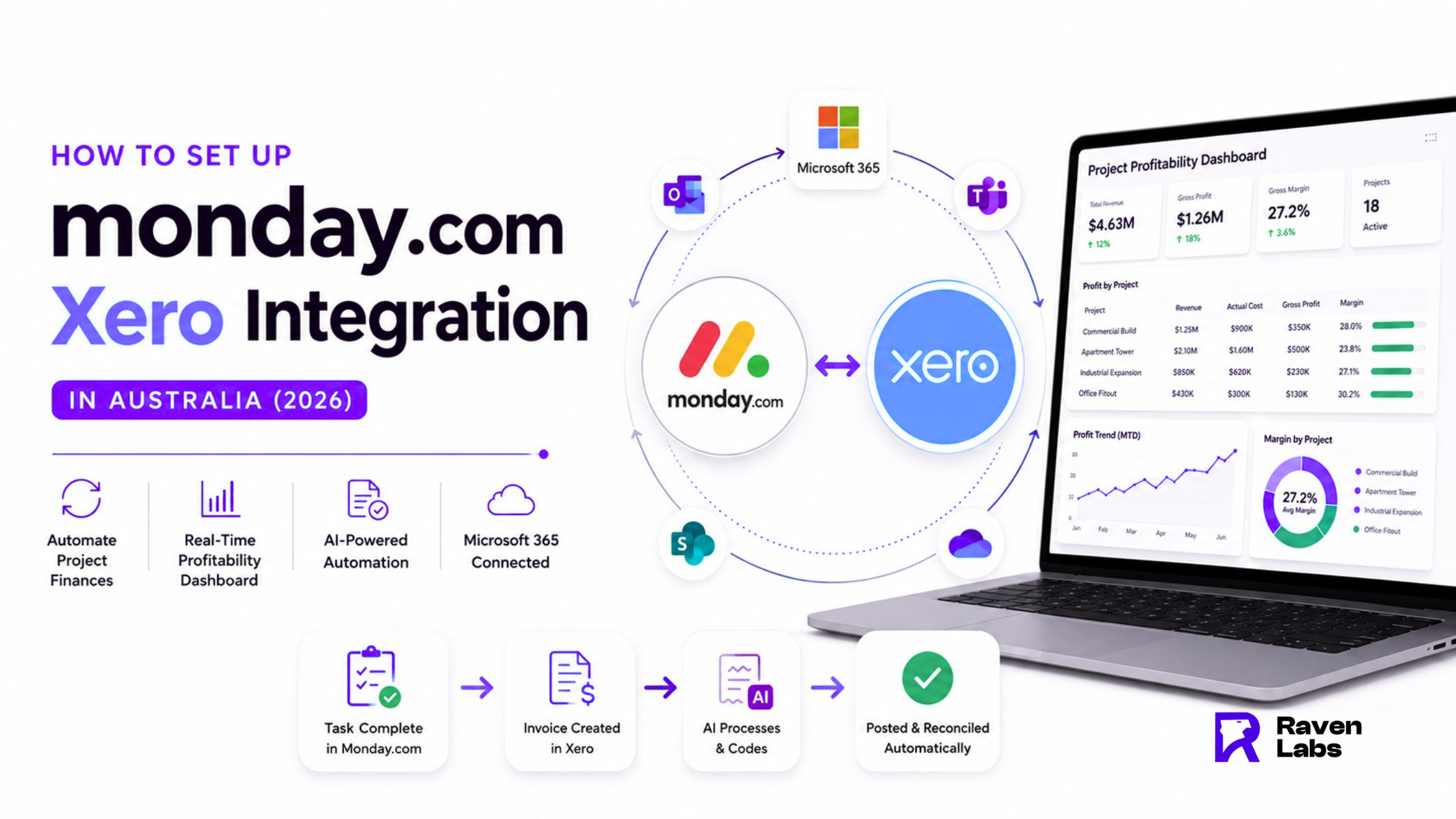
The Problem: Sales, Projects and Finance Don’t Talk to Each Other
Every project-based business in Australia knows the scene. Sales are tracked in one tool, project managers are working in Monday.com, the accounts team is invoicing in Xero, files are scattered across email and OneDrive, and nobody can answer the most important question of the week: are we actually making money on this project?
A properly designed Monday.com Xero integration solves this. In 2026, with rising labour costs, tightening margins and clients demanding live updates, running disconnected systems is the fastest way to bleed profit. This guide explains how Monday and Xero work together, how the right Monday Xero integration architecture is built for Australian businesses, and how to layer in Microsoft 365 and AI to turn your operations into a single source of truth.
The Cost of Keeping Monday.com and Xero Apart
Before the fix, it is worth quantifying the cost of doing nothing. Australian project-based businesses running disconnected Monday.com, Xero, email and file storage typically face the following hidden costs:
- Double data entry. Project costs entered in Monday.com get re-keyed into Xero. Industry research shows manual data entry carries roughly a 1% error rate per field, and automation can reduce this by up to 80%.
- No real-time project profitability. By the time the bookkeeper reconciles the month, the project is already three weeks finished. You find out you lost money on a job after you can no longer do anything about it.
- Manual compliance and admin. GST coding, supplier invoices, plant hire receipts, subbie payments and BAS prep all chew through hours that should be billable.
- Missed billing milestones. A task hits “complete” in Monday.com, but the invoice does not go out for ten days because nobody tells accounts.
- Stale dashboards. Leadership meetings happen on screenshots from last week’s data, not live numbers.
For a business turning over $5 million annually, these inefficiencies typically cost $80,000 to $250,000 per year in lost time, billing leakage and margin erosion. That is the budget you are already spending by not connecting Monday.com and Xero.
The Solution: A Unified Architecture for Monday Xero Integration
The right Monday.com integration with Xero is not a single connector. It is an architecture. Here is the stack we deploy at Raven Labs for Australian project-based businesses:
Layer 1 – Monday.com (operations hub) Sales pipeline, estimating, project boards, resource and crew scheduling, site task tracking, plant and labour utilisation.
Layer 2 – Xero (financial source of truth) Invoicing, supplier bills, payroll, GST, BAS, bank reconciliation, project accounting via Xero Projects.
Layer 3 – Microsoft 365 (productivity and documents) Outlook for client communication, SharePoint and OneDrive for site documentation, Teams for crew coordination, Word and Excel for proposals and reports.
Layer 4 – Power BI (real-time project profitability dashboard) The unifying view. Live data from Monday.com (committed costs, hours worked, milestones) blended with Xero (actual invoices, supplier bills, payroll) to produce true project profitability in real time.
How the Monday.com Xero Integration Actually Works
There are three common ways to build the Monday Xero integration in Australia:
- Native marketplace apps such as Luxie Tech for Monday.com, available through the Xero App Store. Good for straightforward two-way sync of invoices, contacts, quotes and purchase orders.
- iPaaS platforms like Make.com, Zapier, Integrately or n8n. Best when you need conditional logic, multi-step workflows or branching automation.
- Custom integrations built on the Monday.com and Xero APIs, deployed when business logic is complex (multi-entity invoicing, project-level GL coding, custom approval flows).
Most Australian businesses end up with a hybrid: a native app for the high-volume invoice and contact sync between Monday.com and Xero, plus iPaaS workflows for the edge cases. The Xero monday integration choice depends on data volume, complexity and how much custom logic you need to apply between the two systems.
A Note on Simpro for Trades
If your business is a pure trades operation (electrical, plumbing, HVAC, fire protection) and you need deep field service management, Simpro often sits in the stack alongside or instead of Monday.com. Simpro handles job scheduling, technician dispatch and mobile field operations natively, and integrates with Xero for accounts. The pattern for trades businesses is Simpro for field operations, Monday.com for higher-level project and sales pipeline management, and Xero for finance, all unified in Power BI.
The AI Layer: Where 2026 Gets Interesting
The Monday.com Xero integration is the foundation. The real productivity gains in 2026 come from layering AI on top.
Automated receipt and invoice processing. Site teams snap photos of receipts on-site. AI extracts the supplier, GST, amount, project code and category, posts it directly to Xero, attaches the receipt image, and updates the project cost in Monday.com — all without anyone touching a keyboard. Time saved per week for a mid-sized contractor: 6 to 12 hours of admin.
Supplier bill automation. Subcontractor and supplier invoices arrive in a dedicated inbox. AI reads them, matches them to purchase orders raised in Monday.com, codes them to the correct project and GL account, and queues them for approval in Xero. Reconciliation time typically drops by around 80%.
AI document generation. Project status reports, scope of works documents, variation orders, safety reports and client updates are generated automatically from live Monday.com and Xero data using Microsoft Copilot or Claude. A weekly client status update that took 90 minutes to write now takes under 5 minutes to review and send.
Compliance and site documentation tracking. AI monitors SharePoint and OneDrive site folders, flags missing documents (SWMS, inductions, insurance certificates, ITPs), and alerts the project manager in Monday.com before a compliance gap becomes a regulator visit.
This is where monday com microsoft 365 automation delivers compounding value. Once Outlook, Teams, SharePoint and OneDrive are connected to Monday.com, AI has the context it needs to act intelligently across the entire business.
Use Cases by Industry
Construction and Subcontractors
A mid-sized commercial builder running 12 to 30 concurrent projects gains live margin per project. When a variation is approved in Monday.com, the invoice draft auto-generates in Xero. Plant and labour utilisation reports update daily in Power BI. Site documentation is tracked automatically. Typical result: 3 to 6% margin recovery on previously underperforming jobs.
Trades (Electrical, Plumbing, HVAC, Fire)
Field technicians log jobs and timesheets in Simpro or Monday.com. Materials hit Xero through automated supplier feeds. Customers receive invoices the same day a job is completed. WIP and accounts receivable shrink dramatically and cash flow becomes predictable.
Engineering and Consultancy
Time-based billing becomes painless. Engineers log hours against project tasks in Monday.com, those hours sync to Xero for invoicing, and Power BI shows live realisation rates per consultant, per project, per client. Scope creep gets caught in week one, not week ten.
Professional Services (Architects, Designers, Agencies)
Project pipeline in Monday.com, contracts in OneDrive, invoices in Xero, all unified in a dashboard the founder can check on her phone. End of quarter stops being a panic. Forecast accuracy improves, retainer renewals become predictable, and AI document generation handles the routine client deliverables.
How to Automate Project Finances Between Monday and Xero: A 90-Day Rollout
The businesses that succeed treat this as a 90-day programme, not a software install. Here is the playbook we use to automate project finances Monday Xero customers typically follow:
Days 1–14: Discovery. Map your current process. Identify the three highest-cost inefficiencies. Quantify the cost of doing nothing.
Days 15–30: Architecture and pilot. Design the integration architecture. Pick the right combination of native apps, iPaaS and custom. Pilot on one active project end-to-end.
Days 31–60: Build and integrate. Deploy the Monday.com Xero integration. Configure Microsoft 365 automation. Build the Power BI real-time project profitability dashboard.
Days 61–90: Train and scale. Roll out across project teams. Train office and field crews separately, because they need different things. Layer in AI for receipts, invoices and documents.
By day 90, the typical Australian client saves 15 to 30 admin hours per week, has live project P&L visibility, and is making bid decisions based on actual margin data instead of gut feel.
Conclusion
Project-based Australian businesses cannot afford to run sales, projects and finance as separate worlds anymore. A properly architected Monday.com Xero integration, layered with Microsoft 365 automation and a Power BI real-time project profitability dashboard, turns disconnected tools into a single operating system for your business.
The technology is mature, the integrations are stable, and the AI layer in 2026 is genuinely useful, not hype. What separates the winners from the businesses still living in spreadsheets is implementation quality, not software choice.
Ready to See What This Looks Like for Your Business?
Raven Labs designs and deploys integrated operations stacks for Australian project-based businesses across construction, trades, engineering and professional services. We combine Monday.com, Xero, Microsoft 365, Power BI and AI into a single real-time view of your sales, projects and profitability.
Book a free dashboard scoping session at theravenlabs.com. In 45 minutes we will map your current stack, identify the three highest-ROI integration opportunities, and show you what a live project profitability dashboard for your business could look like.
Contact us Today :
mail – [email protected]
phone – 1300 305 009
website – https://www.theravenlabs.com/
About Raven Labs
The Raven Labs team consists of technology consultants, automation specialists and AI implementation experts based in Melbourne and Sydney. We have helped 100+ Australian busine
sses across construction, trades, engineering, professional services, hospitality, eCommerce and retail deploy integrated operations stacks that deliver measurable results. Learn more at theravenlabs.com.
FAQ’S
1. What is the best way to set up a Monday.com Xero integration in Australia?
The best approach depends on your complexity: native marketplace apps work for simple two-way invoice and contact sync, while iPaaS platforms or custom builds are better for multi-step workflows and multi-entity accounting.
2. How much does a Monday.com integration with Xero cost in Australia?
Native app subscriptions for monday com xero australia setups typically start at AUD $30 to $80 per month, with iPaaS workflows adding AUD $50 to $300 per month depending on volume. Full implementation consulting with Microsoft 365 automation and a Power BI dashboard usually ranges from AUD $15,000 to $60,000 depending on scope and complexity.
3. How long does it take to automate project finances between Monday and Xero?
A focused implementation takes 6 to 12 weeks for a mid-sized Australian project-based business, with simpler single-entity setups going live in 4 weeks. Multi-entity construction and engineering businesses with complex GL coding typically run 10 to 16 weeks end-to-end.
4. Can I get real-time project profitability from Monday and Xero alone?
Partially – Monday.com tracks committed costs and project progress while Xero tracks actuals, but neither tool blends them into a single live view by default. To get a true real-time project profitability dashboard, you need a reporting layer like Power BI sitting on top of both, combining the committed and actual data into one view per project.
5. Does the Monday.com Xero integration work for trades businesses using Simpro?
Yes – the standard pattern is Simpro for field service operations, Monday.com for sales pipeline and higher-level project tracking, and Xero for finance, all feeding a unified Power BI dashboard. This stack works particularly well for electrical, plumbing, HVAC and fire protection businesses that have both project-based and service-based revenue streams.